6 MFA Myths That Leave Your VPN Wide Open

MFA on your VPN only guards the login. This beginner's guide explains session hijacking, login-bypass bugs and push fatigue, plus the warning signs that catch what MFA misses.

November 08, 2026
Victor Nthuli
Security Best Practices
5 min read

Table of Contents

Loading...

Imagine locking your front door with two keys and then leaving a window open. A lot of teams do this with their VPN. They add multi-factor authentication and treat the job as done.

First, two terms. A VPN (virtual private network) is a secure tunnel that lets staff reach company systems from outside the office. MFA (multi-factor authentication) means you prove who you are with more than one thing, usually a password plus a code or a tap on your phone.

MFA is worth having. The catch is that it guards only one moment, which is the login. The six myths below all come from forgetting that.
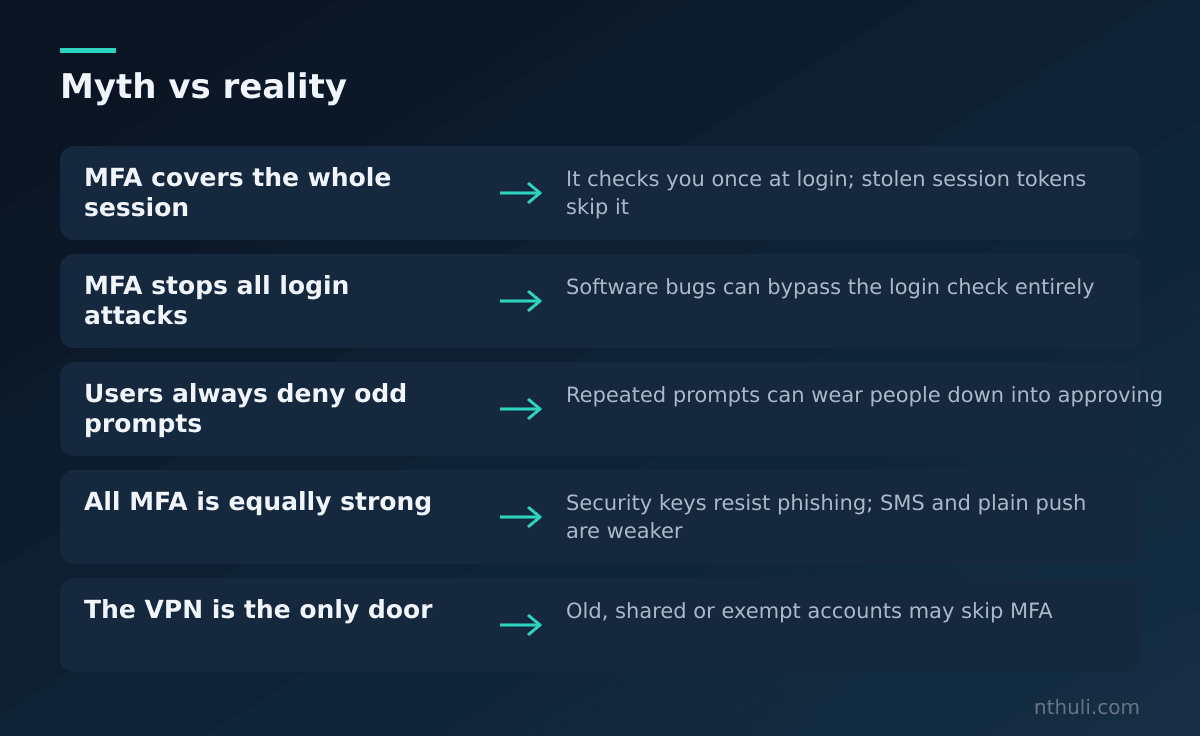
Common MFA myths about VPNs paired with what is actually true

Myth 1: MFA protects the whole session

Once you log in, the VPN gives your device a session token. Think of it as a festival wristband. Anyone who steals the wristband can walk past the gate. If malware on a laptop copies that token, the attacker never has to face MFA.
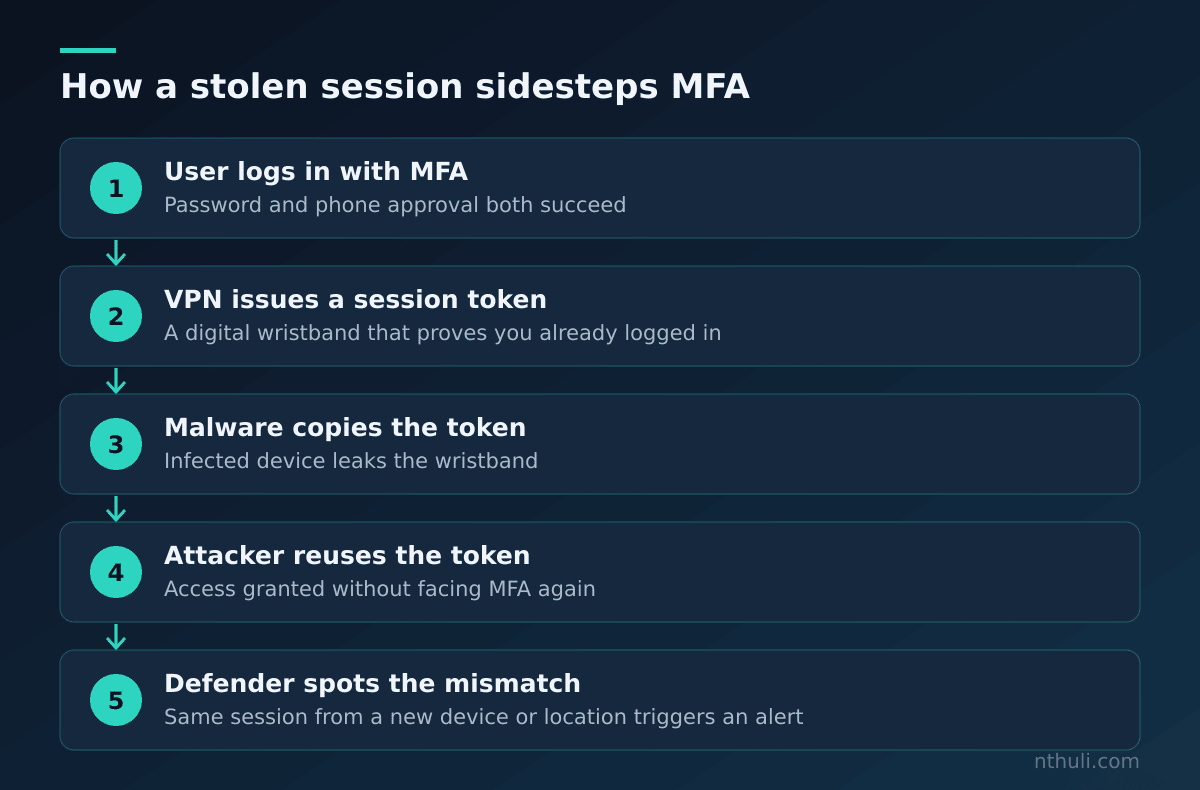
Simplified steps showing how a session token can be reused after a valid MFA login

Myth 2: MFA stops every attack on the login

An auth-bypass bug is a flaw in the VPN’s own software that lets someone skip the login check entirely. When that happens, the MFA question never gets asked. That makes patching the VPN quickly just as important as strong passwords.

Myth 3: People will always deny strange prompts

Push fatigue works like this. An attacker who already has a stolen password sends approval request after approval request until a tired or confused person taps “Approve” just to make them stop.
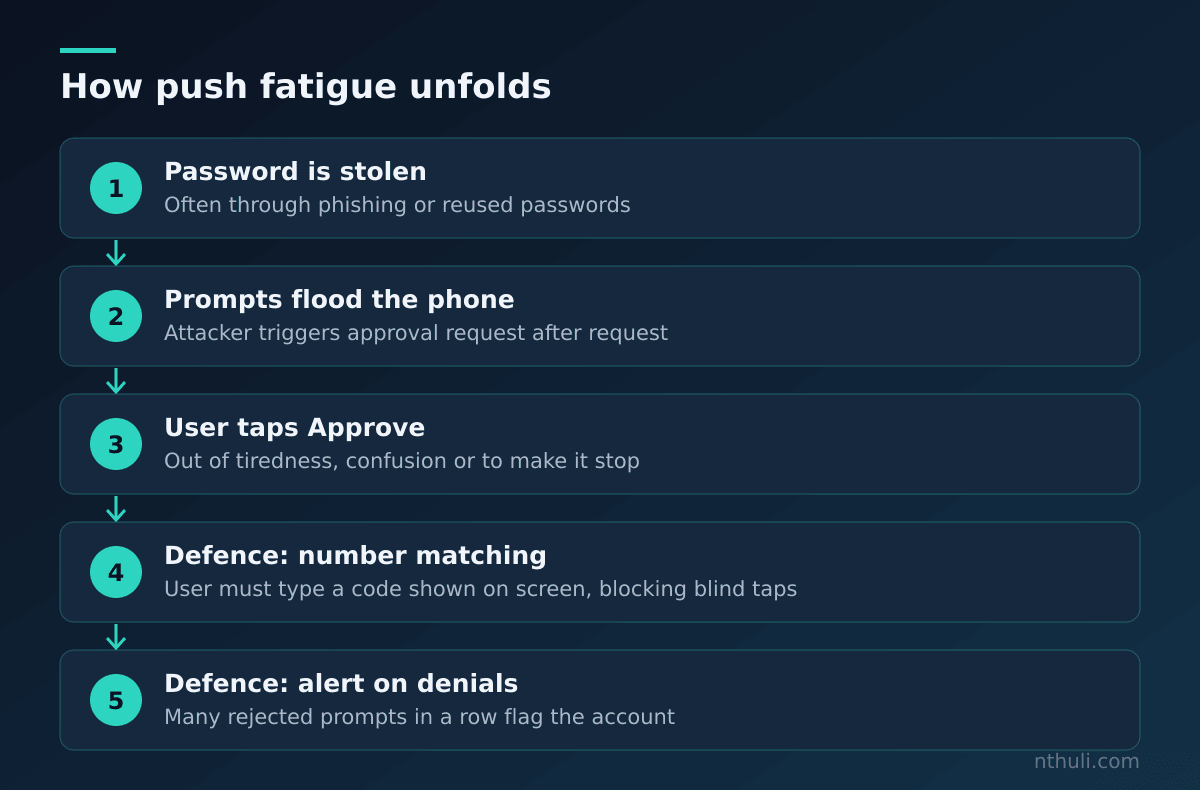
Steps of a push fatigue attempt and where it can be stopped

Myth 4: Every kind of MFA is equally strong

Text-message codes and simple push approvals can be phished or nagged out of people. Phishing-resistant methods, such as hardware security keys, check that you’re on the real site, so a fake login page gets nothing useful.

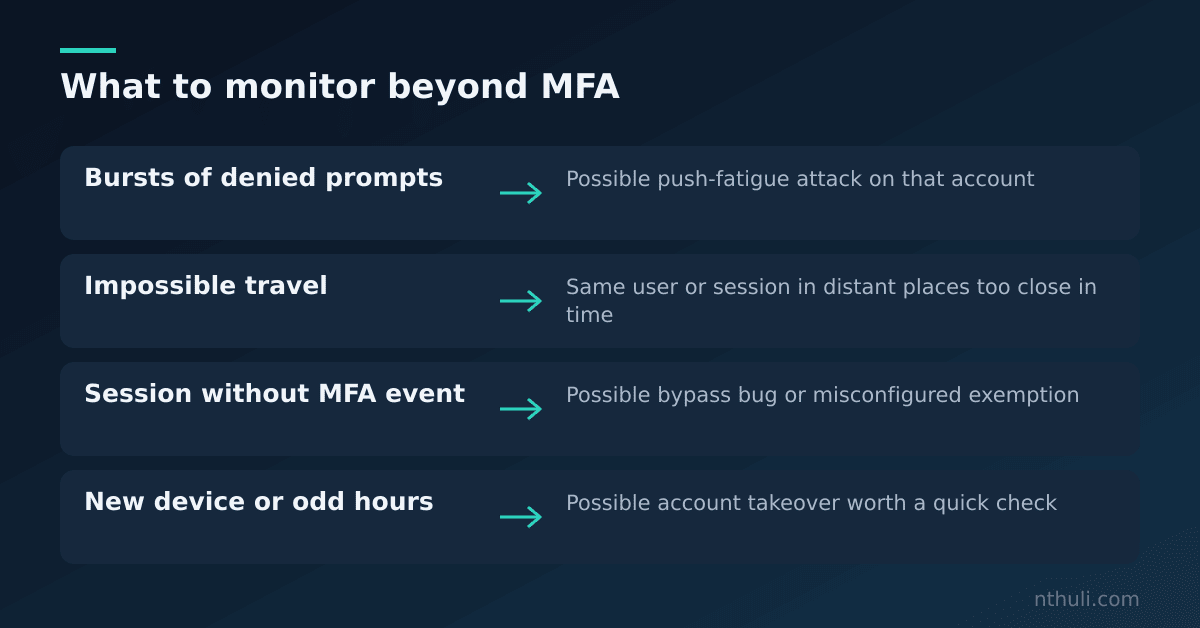
Myth 5: With MFA on, nobody needs to watch the logs

Logs are the security camera. They catch what the lock misses.

Warning sign What it might mean Everyday comparison
Many denied MFA prompts Push-fatigue attempt Someone ringing your doorbell nonstop
Same session from two countries Stolen session token One ticket scanned at two venues
Login with no MFA record Bypass bug or exempt account Guest inside with no sign-in
New device, odd hours Account takeover Your car driven at 3 a.m.

Log signals that reveal VPN problems MFA alone would miss

Myth 6: The VPN is the only way in

Old accounts, shared “service” accounts used by software, and older login methods are often left out of MFA rules. Attackers look for exactly these side doors.
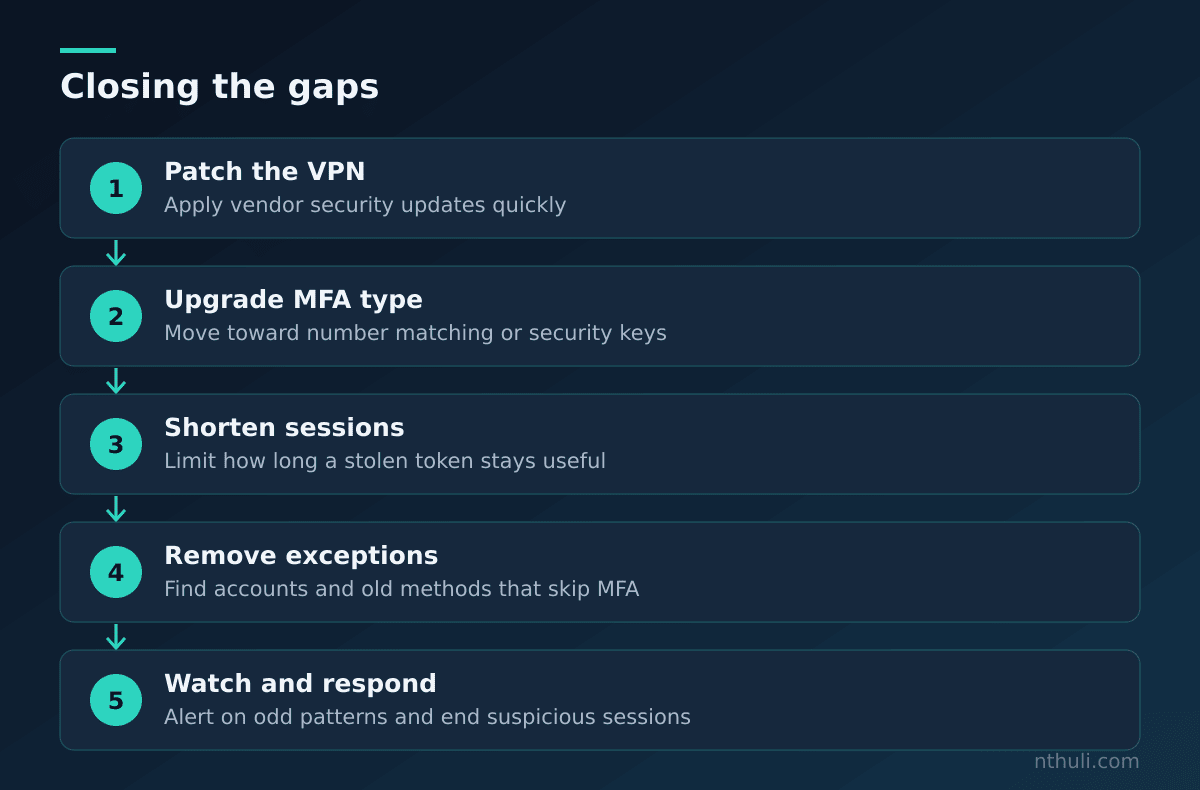
Ordered steps a team can take to strengthen VPN security beyond MFA

What to learn from this

  • MFA protects the login, not everything after it. Keep sessions short and require people to log in again for sensitive actions.
  • Patch VPN devices quickly. A bypass bug makes MFA irrelevant.
  • Use number matching or security keys so a random tap can’t approve an attacker.
  • Alert on unusual patterns, such as floods of prompts, impossible travel and logins with no MFA record.
  • Audit for exceptions. List every account that skips MFA and close the gaps.

Tags

MFA VPN Monitoring Identity

Victor Nthuli

Security Operations Engineer specializing in incident response, threat hunting, and compliance alignment for regulated industries.

Related Posts

November 07, 2026

Claude Code's 'Don't Ask Again' Files: Find and Fix Leaked Keys

One click on "Yes, and don't ask again" in Claude Code can save a password into a project file. That file has turned up in 1,122 public GitHub copies. This post corrects five common beliefs about it and explains how to find, revoke and hide these files.

Read More
November 06, 2026

*sshole: Patch and Hunt OpenSSH Long-Password Logins on Alpine

On musl-based systems such as Alpine, a password over 256 bytes could log in to "*" key-only accounts through OpenSSH. Here's how to find exposed hosts, patch to 10.6p2, and search auth logs for logins that should be impossible.

Read More

Table of Contents

Loading...

Recent Posts

  • 6 MFA Myths That Leave Your VPN Wide Open

    November 08, 2026

    Current Post
  • Claude Code's 'Don't Ask Again' Files: Find and Fix Leaked Keys

    November 07, 2026

    Read Post
  • *sshole: Patch and Hunt OpenSSH Long-Password Logins on Alpine

    November 06, 2026

    Read Post
  • Hackers Defrosted Europe's Supermarkets: The Gear Your SOC Can't See

    November 03, 2026

    Read Post
  • Pyramid of Pain: Why Blocking Hashes Won't Save Your SOC

    November 02, 2026

    Read Post
  • Build Your First Malware Analysis Lab in One Weekend

    November 01, 2026

    Read Post
  • 5 Secrets Rotation Myths That Keep Leaked Credentials Working

    November 01, 2026

    Read Post
  • RustVault: I Built My Own Password Vault, Then It Tried to Lock Me Out

    October 20, 2026

    Read Post
  • Responsible Disclosure: Browser DevTools and Direct File Access in SlidesGPT

    April 01, 2025

    Read Post
  • Bluewave vs Uptime Kuma: A Real-World Comparison for Monitoring Uptime and Beyond

    March 26, 2025

    Read Post
  • Nextcloud

    March 25, 2025

    Read Post
  • 🔍 Keeping Your Linux Services in Check: How I Use Monit for Bulletproof Monitoring 🚨

    March 23, 2025

    Read Post

About the Author

Victor Nthuli is a Security Operations Engineer with expertise in incident response, SIEM implementation, and threat hunting. With a background in cybersecurity and a passion for Linux systems, he provides insights based on real-world experience.

Learn More

Subscribe for Security Updates

Get notified when new security articles and insights are published.

Need Enterprise Security Solutions?

Visit SocDev Africa for comprehensive security services and software development solutions for your organization.

Visit SocDev.Africa